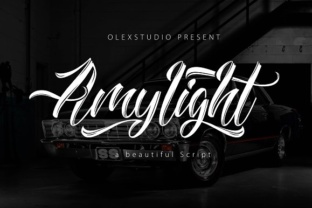
Amylight: A Handwritten Script Font That Brings Warmth and Clarity to Your Projects
Choosing the right typeface can make or break a design. You need something that communicates personality without sacrificing readability, something that feels both professional and approachable. This is where Amylight comes in—a beautiful handwritten script font that blends fluid motion with clean legibility. Whether you are building a brand, designing marketing materials, or working on a personal craft project, Amylight offers a versatile solution that doesn’t force you to choose between elegance and function.
What Is Amylight and Why Does It Matter?
Amylight is a script font inspired by natural handwriting. Its characters flow smoothly, with gentle curves and consistent spacing that make it easy to read at various sizes. Unlike many script fonts that sacrifice clarity for style, Amylight maintains distinct letterforms, so your message never gets lost in swirls. This balance is exactly what many designers and small business owners have been looking for—a typeface that adds a human touch without looking messy or amateur.
For anyone who has struggled with finding a script font that works across both print and digital platforms, Amylight provides a reliable answer. Its fluid design adapts well to curved surfaces, layered compositions, and varied color schemes. You can use it for a logo, a wedding invitation, a social media post header, or a product label, and it will consistently deliver a warm, polished look.
Common Challenges When Using Script Fonts
Script fonts come with a reputation for being difficult. Many are too ornate to read at small sizes, too rigid for modern branding, or too specific to one style. Here are a few challenges that Amylight directly addresses:
- Legibility issues: Many handwritten fonts connect letters in confusing ways, making words hard to decipher. Amylight’s open forms and clear spacing reduce eye strain.
- Inconsistent weight: Some script fonts have dramatic thick-thin variations that look uneven on screen. Amylight maintains a uniform stroke weight that feels balanced.
- Limited versatility: A font that works for a wedding invitation may fail on a business card. Amylight’s moderate contrast and neutral personality allow it to shift from formal to casual with ease.
- Overwhelming personality: Script fonts often steal attention from the content. Amylight supports your message instead of overshadowing it.
If you have faced any of these frustrations, Amylight can be the practical fix you need.
How Amylight Helps You Overcome These Hurdles
The core strength of Amylight lies in its thoughtful construction. The letters are designed to be fluid without being flamboyant. Ascenders and descenders are proportional, so words stack naturally in titles or pull quotes. The baseline remains steady, which is critical for body copy or short snippets in a brand guide.
For marketing and branding professionals, this means you can use Amylight in a primary logo element and still pair it easily with a clean sans-serif for supporting text. The font’s subtle personality does not compete; it complements. For example, a coffee shop brand might use Amylight for the shop name on packaging, then switch to a simple sans-serif for ingredient lists and contact info. The result is a cohesive system that feels bespoke without being brittle.
Craft project enthusiasts will appreciate how Amylight behaves in physical materials. When printed on textured paper or cut with a vinyl cutter, the strokes hold their shape. The font works beautifully on greeting cards, scrapbook titles, and custom stickers. Because the letters are not overly thin or delicate, they survive resizing and reinterpretation in different media.
Practical Applications Across Different User Groups
Different users approach the same font with different goals. Here is how Amylight meets the needs of three common audiences:
Small Business Owners and Entrepreneurs
If you run a business and handle your own branding, you need a font that looks intentional without requiring a design degree to implement. Amylight works well for logos, social media graphics, thank-you cards, and packaging. Because it is easy to read, you can use it for smaller text elements like taglines or website headings without worrying about legibility loss. A local bakery, for instance, can use Amylight for their storefront signage and then repeat it on digital coupons, creating a consistent visual identity that customers recognize instantly.
Graphic Designers and Creative Professionals
Designers often need a script font that can anchor a visual hierarchy. Amylight is fluid enough to serve as a display face for hero images, but its clean structure allows it to function in body copy at larger sizes for short paragraphs. When working on a client project for a boutique brand, you can rely on Amylight to convey warmth without looking generic. Pair it with a geometric sans-serif like Poppins or a soft serif like Lora for a modern, approachable vibe.
DIY Hobbyists and Crafters
For scrapbooking, handmade invitations, or calligraphy-style projects, Amylight offers a realistic hand-lettered look without the effort of drawing each letter. You can type your text, adjust the size and color, and then print or cut it. The font’s natural flow works well on curved paths, such as circular stamps or banners. Many crafters find that Amylight saves them hours while producing consistent, professional results.
Recommendations for Making the Most of Amylight
To get the best outcome with Amylight, keep these practical tips in mind:
- Size matters: For print, use Amylight at 14 points or larger for readability. On digital screens, 18–24 pixels is a good starting point for body text.
- Pairing advice: Combine Amylight with a neutral sans-serif font for contrast. Use Amylight for headings or accent words, and the sans-serif for long passages. This keeps the design feeling clean.
- Color and background: Amylight works best on solid or softly textured backgrounds. Avoid placing it over busy photos unless you add a strong drop shadow or background shape.
- Letter spacing: The default spacing is generous, but if you use Amylight in all-caps or for short logos, slight adjustments to tracking can give it a more cohesive feel.
- Test before finalizing: Print a sample of your project at actual size. Script fonts can look different on paper than on screen. Amylight’s consistent design usually translates well, but it is always smart to check.
Useful Considerations and Realistic Outcomes
No font is a magic solution, and Amylight is no exception. Here are a few things to keep in mind so you can set appropriate expectations:
- Licensing: Always check the license for your intended use. Amylight may be available in different licensing tiers for personal versus commercial projects. If you plan to use it in a product you sell, confirm that your license covers that.
- File formats: Standard formats like OTF and TTF work across most software. If you are using a web-based tool like Canva, ensure the font uploads correctly—some platforms have limitations.
- Alternatives: While Amylight is excellent for many projects, you may need a more formal script for legal documents or a more playful one for children’s content. Evaluate the tone of your project before committing.
- Accessibility: For websites, script fonts are best reserved for decorative elements. Use a readable web-safe font for body text to support screen readers and users with visual impairments.
When used thoughtfully, Amylight can elevate the emotional impact of your work. A marketing brochure that previously felt sterile can gain a layer of warmth. A handmade card becomes something recipients want to keep. The outcome is not just a prettier design—it is a stronger connection with your audience.
Real Examples of Amylight in Action
Imagine a small floral shop updating its brand. The owner uses Amylight for the shop name on the storefront window and on all social media posts. The handwritten feel matches the organic nature of flowers, while the clear letters ensure customers can read the name from across the street. The font becomes a consistent element that ties together different media—Instagram stories, price tags, and even the shop’s delivery van.
Or consider a freelance calligrapher who offers digital products. She creates printable wedding invitation templates using Amylight for the couple’s names and main titles. Because the font is already professional, she needs only minimal hand-lettering for custom details. This speeds up her workflow and lets her offer affordable options to clients who still want a handmade aesthetic.
Even a nonprofit organization running a fundraising gala can benefit. By using Amylight in save-the-date cards and event signage, the organization projects both warmth and reliability—two traits that encourage donors to attend and contribute.
How Different Users Approach Amylight
A professional designer will likely experiment with Amylight’s kerning and pair it with multiple complementary fonts to fine-tune a visual system. A business owner might use the font as-is, trusting its default spacing and applying it consistently across a few key assets. A crafter may export single letters to create monograms or use the font to generate captions for collages. Each approach is valid because Amylight adapts to the skill level and goal of the user.
If you are new to script fonts, start by using Amylight for one project—perhaps a single social media graphic or a thank-you card. See how it feels in your hands. Adjust size and placement until the text feels natural. Over time, you will develop a sense for when Amylight is the right choice and when a different font might serve better.
Final Thoughts on Making Amylight Work for You
Ultimately, Amylight delivers on the promise of a handwritten script that is both beautiful and practical. It solves the common problems of illegibility, inconsistency, and limited versatility that plague many script fonts. Whether you are a designer, a business owner, or a DIY enthusiast, this font gives you a reliable tool to express warmth and professionalism without sacrificing clarity.
Take the time to test Amylight in your specific context. Print samples, compare it with your brand colors, and ask a colleague or friend for feedback on readability. When you find the right application, the fluid lines of Amylight will help your work stand out—and more importantly, connect with the people you are trying to reach.