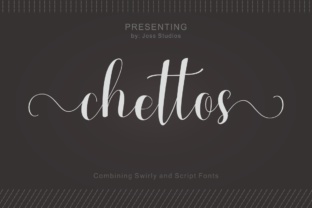
Chitos: A Hand Lettered Calligraphy Font Built for Real Projects
If you have ever tried to make a design feel personal without spending hours drawing each letter by hand, you already understand why a font like Chitos exists. It is a hand lettered calligraphy font that does not pretend to be something it is not. It carries that natural, slightly uneven flow you get when someone writes with a pointed pen on paper. But instead of being a static scan of someone's handwriting, it gives you over 250 unique glyphs to work with. That means you get variety inside a single typeface. You get alternates, ligatures, and stylistic sets that let you shape the text so it does not look like a machine simply repeated the same letter twenty times in a row.
For anyone who works with words visually, that difference matters more than you might expect. A logo, a wedding invitation, a social media post, a product label, or even a simple quote graphic can look flat when every single "a" or "e" is identical. But when the letterforms shift and flow naturally, the whole piece feels like something someone actually wrote. That is the gap Chitos fills. It brings a handcrafted look into digital work without forcing you to become a professional calligrapher.
Where Hand Lettering Makes a Difference in Everyday Work
Think about the last time you needed to create something that felt warm, approachable, or personal. Maybe it was a thank-you card for a client, a flyer for a local workshop, or a header image for a blog post about slow living. If you reached for a standard serif or sans-serif font, you probably got something clean but cold. If you reached for a decorative script that was too ornate, it probably felt stiff or hard to read. Chitos sits in that middle ground where readability meets personality.
One realistic place this font shines is in short-form branding. Small business owners, for example, often need to put together a visual identity without a full design team behind them. A bakery owner selling handmade sourdough, a freelance photographer launching a new website, or a stationery shop owner building an Etsy store all face the same challenge. They need their text to reflect the care they put into their actual work. Using Chitos for a business name, a tagline, or a section header can communicate that handmade quality instantly.
Another setting is educational content. Teachers, tutors, and course creators frequently produce worksheets, study guides, or presentation slides. If you have ever tried to make a handout feel less like a photocopied textbook page, you know how much a font choice can change the tone. A calligraphy font like Chitos used sparingly, maybe for a title or a pull quote, can make the material feel more inviting without sacrificing legibility for the main body text.
Different Users, Different Needs, Same Font
One of the interesting things about Chitos is how it adapts to different contexts without feeling out of place. That is not true for every decorative font. Some scripts look great on a wedding invitation but ridiculous on a product label. Chitos has a natural, unforced character that makes it more versatile.
- Bloggers and content creators often need featured images, Pinterest pins, or Instagram story text that stops the scroll. Using Chitos for a short headline or a call-to-action like "read this" or "save for later" adds a hand-lettered touch that stands out against photo backgrounds. It also pairs well with clean sans-serif fonts for body text, so the overall layout stays balanced.
- Marketers and small business owners can use it in email headers, landing page subheadings, or product packaging. When you are selling something handmade or artisanal, every visual cue matters. A label that uses Chitos for the product name signals that the item inside was made with attention, not mass-produced in a warehouse.
- Freelancers and creative professionals like illustrators, graphic designers, and lettering artists might use Chitos as a base layer that they then modify or combine with other elements. Because it has over 250 unique glyphs, you have room to play with swashes, alternate characters, and ligatures to create something that feels custom without starting from scratch.
- Publishers and editors working on book covers, magazine layouts, or editorial projects can use Chitos for chapter titles, section openers, or pull quotes. The font adds a literary, thoughtful feel that matches topics around lifestyle, creativity, wellness, or personal development.
Practical Scenarios Where Chitos Proves Useful
Let me walk through a few specific situations where Chitos does not just look nice but actually solves a problem.
Scenario one: A freelancer designing a client's branding package. You have a client who runs a small organic skincare line. They want their packaging to feel natural, feminine, and honest. You could spend hours hand-lettering each product name and hoping it turns out consistent across labels. Or you could use Chitos, select alternate glyphs for variety, and get a consistent but organic look across the whole product line. The client gets a professional result, and you save time that you can put toward other parts of the project.
Scenario two: A hobbyist making a digital scrapbook or family recipe book. Maybe you are not selling anything. You just want to create something meaningful for your family. A handwritten font like Chitos lets you add titles and captions that look like you wrote them yourself. You can pair it with photos, vintage backgrounds, or simple layouts. The result feels personal, not generic. And because you can tweak the glyphs, each page can have its own subtle variation.
Scenario three: An entrepreneur creating a lead magnet or freebie. Many small business owners offer a downloadable PDF, checklist, or guide in exchange for email signups. That PDF is often the first impression a potential customer gets of your brand. Using a calligraphy font for the title or key headings can make the freebie feel more polished and valuable. It does not cost extra to use a better font, but it can change how people perceive the quality of what you are giving away.
What to Consider Before Downloading or Buying Chitos
No font is perfect for every situation, and Chitos is no exception. Being honest about its strengths and limitations helps you decide if it fits your project.
Spacing and kerning matter a lot. Hand lettered fonts often have irregular spacing because they mimic natural handwriting. That is part of the charm, but it also means you may need to adjust letter spacing manually in your design software. If you are designing something with tight space constraints, like a small logo or a narrow banner, test the font at your intended size first. Some letter combinations might need a tiny nudge to look balanced.
Legibility is best for short to medium text. Chitos works beautifully for headlines, titles, names, quotes, and short phrases. It is not designed for long paragraphs or dense body copy. If you try to use it for a 500-word block of text, readers will struggle, and the natural flow gets lost. Keep it where it shines: in places where each word gets attention.
Over 250 glyphs means you need to know how to access them. If you are new to using OpenType features, take a few minutes to learn how alternate characters, ligatures, and stylistic sets work in your design program. Programs like Adobe Illustrator, InDesign, Photoshop, Affinity Designer, and even Canva (if you have the right setup) let you access these features. But if you just type without exploring the glyph panel, you are using only a fraction of what the font offers.
Pair it with a neutral, readable font. Chitos works best as a companion to something simpler. A clean sans-serif like Lato, Montserrat, or Open Sans balances the decorative nature of the calligraphy. A classic serif like EB Garamond or Merriweather can also work if you want a more traditional feel. The contrast between the two fonts creates visual hierarchy and makes your layout easier to scan.
Connecting Font Features to Real Outcomes
It is easy to list features of a font and assume people will connect the dots. But let me be direct about what the 250-plus glyphs actually do for you in practice.
The multiple alternates mean you can avoid the "same letter problem." When you type a word like "little" or "success," a standard font repeats the same "l" or "s" over and over. That looks fine for body text, but for display use, it feels robotic. With Chitos, you can choose different versions of the same letter so the word looks handwritten. That is useful in logos, monograms, and any design where the same letter appears multiple times.
The ligatures help tricky letter combinations flow smoothly. Certain pairs like "Th," "fi," or "lo" can look awkward in script fonts if they do not connect naturally. Ligatures replace those combinations with a single, properly joined glyph. That means you spend less time tweaking and more time designing.
The swashes and decorative glyphs give you options for flourishes without adding extra elements. You can extend a descender, add a tail to a capital letter, or finish a word with a subtle swoosh. This keeps your design clean because you are not layering separate decorative elements on top of your text. Everything stays editable and scalable as a single font.
Making the Most of Chitos in Your Own Work
If you decide to try Chitos, start with a project where the font can do most of the visual work. A quote graphic, a greeting card, or a social media post with just a few words is a great way to test how it behaves. Experiment with the alternate glyphs. Try different letter spacing. See how it looks on a light background versus a dark one. Notice how it pairs with photographs, patterns, or solid colors.
As you get comfortable, you will start noticing where it fits naturally and where it does not. That instinct comes from using the font in real projects, not from reading about it. And that is exactly the point. A tool like Chitos is not meant to be analyzed from a distance. It is meant to be opened, typed into, tweaked, and placed into something you are making for an actual audience.
Whether you are building a brand, launching a product, teaching a class, or simply making something beautiful for yourself, the right font changes how your message lands. Chitos gives you a hand lettered look without the hours of practice, and it gives you enough variety to make each project feel like your own.