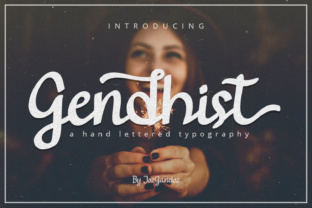
Gendhist: Why This Clean Handwritten Font Works Better Than You Think
Choosing a font for your brand or creative project can feel surprisingly tricky. You want something that feels personal and expressive, but still legible and professional. That’s where Gendhist comes in. Gendhist is a super clean handwritten font. Its thick, confident strokes give it a bold personality, making it stand out without screaming for attention. It’s versatile enough for corporate branding, yet sturdy enough to cut out for physical crafts. But like any design tool, using it well means knowing what it can—and can’t—do. Let’s walk through some common missteps and how to avoid them, so you get the most out of this font every time.
Mistaking "Clean" for "Plain"
One of the first mistakes people make is treating Gendhist like a standard script font. Because it has thick letters and a neat finish, it’s easy to assume it will blend into any layout without much thought. That’s not the case. Gendhist has real character—its curves are deliberate, its weight is consistent, and its spacing has been crafted for a smooth reading experience. When you treat it as a neutral or default option, you lose the expressive edge it brings.
The better approach is to lean into its strengths. Use it where you want to convey warmth and clarity at the same time. For example, on a landing page headline, Gendhist can replace a tired sans-serif and instantly make the message feel more human. Pair it with clean geometric fonts for contrast, or let it stand alone on a simple background. The goal is to let its personality shine, not to hide it.
Underestimating the Importance of Spacing in Handwritten Fonts
Handwritten fonts often come with fixed letter spacing, and Gendhist is no exception. A common oversight is to leave the default tracking (letter spacing) as is, without adjusting for context. In a large headline, the thick letters can appear too tight, making the word feel cramped. In a longer sentence at body size, the same spacing might feel too loose, disrupting the reading rhythm.
Practical advice: always preview Gendhist at the actual size you plan to use. If you’re designing a logo, try increasing the tracking slightly to give each letter breathing room. For shorter phrases, the default spacing usually works beautifully because the thick strokes create a natural, cohesive block of text. The key is to test, zoom in, and trust your eyes. If it feels crowded, it probably is.
Using It for Long Passages of Body Text
This is a mistake I see frequently, especially among beginners who fall in love with a font’s charm. Gendhist is not designed for long paragraphs. Its thick letters and handwritten style are optimized for short bursts of text—titles, subtitles, quotes, call-to-action buttons, and short product descriptions. When you stretch it over a full article or a lengthy product page, readability takes a hit. Readers have to work harder to follow the words, and that extra effort can make them bounce.
A better choice is to reserve Gendhist for the focal points of your page. Use a simpler, more neutral font for the body copy, and let Gendhist do the work of grabbing attention. This not only improves the user experience but also makes your design feel intentional and polished. Your audience will thank you for not making them squint.
Overlooking the Cutting and Crafting Potential
One of Gendhist’s standout features is that it’s easy to cut out, whether you’re using a vinyl cutter, a laser engraver, or even scissors for a DIY project. Because the letters are thick and clean, they hold their shape without breaking. Yet many people overlook this practical side and only think of Gendhist as a digital font.
If you’re a small business owner creating physical products—like signage, stickers, t-shirts, or packaging—this font can save you time and material waste. The thick strokes mean small details won’t get lost in the cutting process. A common mistake is scaling the font too small for a physical cut. When you shrink it, the internal spaces in letters like "a" or "e" can become too narrow for the blade to follow cleanly. Always test the smallest size you intend to cut, and ask your cutting software for a preview of the path. If the enclosed spaces appear tiny, enlarge the text or choose a different variation of the font if one is available.
Ignoring Licensing and Usage Terms
This mistake can cost you time, money, and reputation. Many fonts come with specific licenses that dictate how you can use them—personal use, commercial use, or extended use for things like merchandise or broadcast. Gendhist may be available under different licensing tiers depending on where you download it. Some users assume that buying a font once gives them unlimited rights across all projects. That’s often not the case.
Before you hit download, check the license agreement. If you’re a freelancer designing a logo for a client, make sure the license covers commercial use. If you’re an educator creating worksheets for sale, confirm that the font can be embedded in a PDF. The small print matters. A quick read of the terms can prevent a costly headache later. If you’re unsure, email the foundry or marketplace support—they’re usually happy to clarify.
Choosing the Wrong Weight or Style for the Context
Gendhist, with its thick letters, is naturally bold. But boldness can read differently depending on the surrounding design. In a dark or busy background, the thick strokes might blend into the chaos. In a minimalist layout, the same strokes can become the anchor that holds the composition together.
A mistake I often see is using the font in a context where the contrast is too low. For example, white Gendhist text on a light gray background might look delicate on screen but become unreadable from a distance. The solution is straightforward: always prioritize contrast. Dark text on a light background, or light text on a dark solid block, works best. If you’re layering it over an image, use a semi-transparent overlay behind the text to ensure the thick strokes remain distinct. This small adjustment can make the difference between a design that pops and one that frustrates.
Forgetting to Test on Actual Devices and Materials
This final point applies to both digital and physical uses. On screen, what looks perfect on your monitor may appear too heavy on a phone or too thin on a projector. Always test Gendhist on the device or medium your audience will use. For websites, adjust font size and line height in your CSS and preview on mobile. For print or craft projects, do a small test run before committing to the full batch.
One user I know designed a beautiful menu for a café using Gendhist for the section headers. On her laptop, it looked crisp and inviting. But when printed on the café’s matte paper, the ink spread slightly, and the thick letters lost some of their definition. A quick test print would have caught that. If you’re printing, consider using a slightly smaller font size or adding a tiny bit more letter spacing to compensate for ink spread. A test run takes minutes and saves hours of rework.
Putting It All Together
Gendhist is a versatile, expressive tool that deserves a thoughtful place in your design toolkit. Its clean handwritten style and thick letterforms make it ideal for grabbing attention in headlines, adding warmth to branding, and holding up well in physical cuts. The most common mistakes come from treating it like any other font, rather than respecting what makes it unique.
Take the time to test spacing, check licensing, and match it to the right context. Reserve it for short, impactful text. Give it room to breathe, and it will reward you with a look that feels both handmade and professional. Whether you’re a small business owner creating signage, a freelancer building a brand identity, or a hobbyist crafting custom gifts, Gendhist can elevate your work when used with intention. Skip the shortcuts, trust your instincts, and let this clean handwritten font do what it does best: connect with people in a genuine, memorable way.