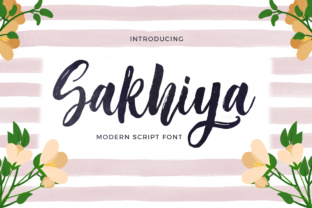
Sakhiya: A Handwritten Script Font with Signature Flow
When you select a typeface for a project, you are choosing more than letters. You are choosing a voice, a mood, and a first impression. Among handwritten scripts, Sakhiya stands out because it does not try to imitate printed handwriting. Instead, it draws directly from the natural rhythm of a signature. Every character feels like it was written in a single, fluid motion. That quality matters whether you are designing a logo, writing a social media post, or building a brand identity that needs to feel personal without looking amateur.
What makes Sakhiya different is its origin. The font was painted completely by hand and then digitally perfected. That process preserves the small inconsistencies that make handwriting feel alive—varying stroke widths, slight angles, and organic curves—while removing the imperfections that can make a font hard to read. The result is a script that looks both effortless and intentional. It does not scream for attention. It invites the reader in.
Why a Signature-Inspired Font Works in Professional Contexts
A signature is one of the most personal marks a person can make. It carries authority and identity in a way that a typed name never does. Sakhiya borrows that psychological weight. When you use it in a headline, a product label, or a call-to-action button, you borrow some of that trust and familiarity.
For professionals who communicate visually, this can shift how an audience perceives a message. A blog header set in Sakhiya feels more approachable than one in a rigid sans-serif. An invitation card feels more intimate. A presentation slide with a hand-lettered quote feels more memorable. The font bridges the gap between polished design and human warmth.
That balance is not easy to achieve. Many handwritten fonts lean too far into either messiness or perfection. Sakhiya lands in the middle. It retains the flow of natural handwriting while maintaining consistent spacing and legibility. That makes it usable in contexts where you cannot afford to sacrifice clarity for style.
Practical Outcomes: What Sakhiya Helps You Accomplish
Choosing a font is a practical decision, not just an aesthetic one. Every typeface either supports your goal or works against it. Here is how Sakhiya can help in specific situations.
Strengthening Brand Personality
If you run a small business, a creative studio, or a personal brand, your visual identity needs to communicate values quickly. Sakhiya can convey authenticity, craftsmanship, and a human touch. A coffee shop menu, a handmade soap label, or a wedding photography website all benefit from a typeface that feels personal without looking unprofessional. The font signals that care went into the design, which reflects well on the quality of the product or service.
It also works well for signature-style logos. A brand name set in Sakhiya can function almost like a stamp of approval. Customers who see it may subconsciously associate the brand with the same trust they place in a handwritten signature.
Saving Time on Design Decisions
Pairing fonts is one of the more time-consuming parts of design. Sakhiya simplifies that process. Its organic curves pair naturally with clean sans-serif fonts like Open Sans, Montserrat, or Lato. It also works with other handwritten or serif fonts, as long as they do not compete for attention. Because Sakhiya has moderate contrast and consistent weight, you can use it as a display font for headings or as an accent font for pull quotes without spending hours tweaking kerning or adjusting sizes.
For marketers and bloggers who need to produce content quickly, this is a real time saver. Instead of testing ten different script fonts, you can rely on Sakhiya to deliver a consistent look across headers, social graphics, and email headers.
Improving Visual Communication in Digital Content
Digital content competes for fractions of a second of attention. A headline set in Sakhiya can stop a scroll. Its handwritten quality feels different from the majority of fonts used online. That visual contrast works in your favor. It signals that the content is personal, opinionated, or human-curated rather than algorithm-generated.
Educators and course creators can use Sakhiya to make slide decks and worksheets feel more welcoming. A quote from a student or a testimonial set in this font reads like a real endorsement. Freelancers presenting proposals can use it sparingly to add warmth without undermining professionalism.
Who Benefits Most from Sakhiya
No font works for every project. Sakhiya is best suited for situations where you want to emphasize personality, warmth, or craftsmanship. Here are the people and roles that tend to get the most value from it.
- Small business owners and entrepreneurs who need a brand identity that feels approachable and trustworthy. A bakery, a boutique, a consultancy, or a coaching practice can all benefit from a signature-style script that appears on packaging, website headers, and social media templates.
- Creative professionals and designers working on projects that require a human element. Invitations, greeting cards, book covers, and branding projects for clients in the lifestyle or wellness space are natural fits.
- Marketers and content creators who produce quotes, social graphics, or email campaigns. Sakhiya adds a personal touch without requiring custom lettering for every post.
- Bloggers and publishers who want their headlines to feel more narrative and less corporate. It works especially well for lifestyle, travel, food, and personal development blogs.
- Educators and freelancers who create handouts, presentations, or digital products. The font makes materials feel curated and thoughtful.
If your work involves formal documentation, dense data, or highly technical content, Sakhiya may not be the best choice for body text. It is a display and accent font. Using it for long paragraphs can reduce readability, especially at small sizes. Reserve it for headings, short phrases, and decorative elements where its personality can shine.
Realistic Use Cases and Examples
Understanding where Sakhiya performs best helps you decide whether it fits your next project. Consider these scenarios.
A wedding photographer wants a watermark for their images. Sakhiya used in a soft gray tone on a corner of the photo feels elegant and unobtrusive. It looks like a signature, which aligns with the personal nature of the work.
A small skincare brand prints labels for their products. The brand name in Sakhiya on a minimalist white label communicates natural ingredients and artisanal care. Paired with a simple sans-serif for the ingredients list, the label feels complete.
A career coach creates a PDF workbook for clients. The title and section headers use Sakhiya, while the body text remains in a clean serif. The contrast makes the workbook feel guided and human rather than mechanical.
A blogger formatting a travel post uses Sakhiya for the post title and a large pull quote. The handwritten quality echoes the personal narrative style of the writing. Readers may pause longer on the quote because it looks like a hand-lettered highlight.
Fit Considerations and Limitations
No typeface is universal. Sakhiya has characteristics that limit where it works best, and being aware of these will help you use it effectively.
Because it is inspired by free-flowing signatures, some letter connections are more open than in traditional cursive. This is part of its charm, but it also means that at very small sizes (below 14–16 pixels on screen), some letters may appear disconnected or harder to read. Avoid using it for body text in mobile layouts or for fine print.
For all-caps usage, Sakhiya may not perform as well as it does in title case or sentence case. Many script fonts lose their flow when characters are forced into uppercase only. If you need an all-caps treatment for a logo or heading, test it first or consider using the font in its natural lowercase-heavy format.
Another consideration is cultural context. Script fonts that imitate Western signatures may not resonate equally across all audiences. If your readers are primarily in regions where cursive handwriting is less common, the font may feel decorative rather than personal. Always test your design with your actual audience if possible.
Finally, Sakhiya is best used sparingly. A page covered entirely in handwritten script becomes hard to scan and visually exhausting. Let it do its work in short bursts—headlines, quotes, names, and accents. That is where it has the most impact.
Bringing the Font into Your Workflow
If you decide to try Sakhiya, start with a single project. Use it for one headline or one graphic element and see how it changes the feel of the piece. Pay attention to how readers react. Do they comment on the design? Do they linger on a quote? Do they describe the brand as warmer or more personal?
Pair it deliberately. A good rule is to use Sakhiya for display purposes and a clean geometric or humanist sans-serif for everything else. That contrast gives the script room to breathe and keeps the overall layout balanced.
In tools like Canva, Adobe Express, or Figma, you can preview Sakhiya with different backgrounds and color schemes. Light backgrounds tend to let the organic strokes stand out. Dark backgrounds with white or light-colored Sakhiya text can feel elegant, but be mindful of readability at smaller sizes.
For print projects, test the font at the actual size it will be used. A script that looks perfect on screen at 72 points may feel different on a business card at 10 points. Always proofread carefully. Handwritten fonts sometimes have alternate glyphs or ligatures that change the appearance of common letter pairs. Knowing those details ahead of time prevents surprises.
Using Sakhiya thoughtfully can elevate a project without requiring custom lettering or illustration. It brings a signature-level of personality to digital and print work alike. When you need a font that feels both human and reliable, it is worth considering as a go-to option for headlines, accents, and brand elements that need to connect on a personal level.