Why most people misuse Hilwen and how to fix it
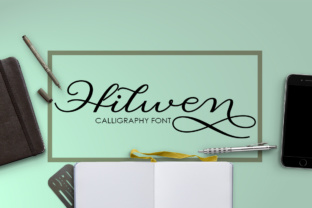
If you have spent any time browsing font collections, you have likely come across Hilwen. Created by Picatype Studio, this calligraphic style font brings a handcrafted feel to digital projects. It comes in two weights: Regular and Bold. On the surface, that sounds simple enough. But here is where things get interesting. Many people download, install, or purchase a font like Hilwen without really understanding what it can do or where it works best. And that is where the trouble starts.
Let me walk through the most common mistakes I see professionals, beginners, and small business owners make when using Hilwen. More importantly, I will show you how to avoid them so your projects look intentional rather than accidental.
Mistake one: treating Hilwen like an all-purpose body font
This is the single most frequent error. Hilwen is a calligraphic style font. That means it carries personality, movement, and a decorative quality. When someone sets an entire paragraph or an entire page of body text in Hilwen Regular, the result is often visually exhausting. The letterforms draw too much attention. Reading becomes a chore rather than a natural experience.
The fix: Reserve Hilwen for headlines, short subheadings, pull quotes, or accent text. If you need body copy, pair Hilwen with a clean, neutral sans-serif or serif font. For example, use Hilwen Bold for a main heading, then a simple font like Open Sans or Lato for the paragraphs below. This gives you the best of both worlds: personality where it counts and readability where it matters.
A better approach looks like this. Your website hero section uses Hilwen Bold for the main tagline. Below it, a short supporting sentence also in Hilwen Regular. Then the body content beneath that uses a neutral companion font. The contrast feels deliberate. The calligraphic energy does not compete with the reading experience.
Mistake two: ignoring the weight difference between Regular and Bold
Because Hilwen only comes in two weights, some people assume the difference is minor. It is not. Regular carries a lighter, more flowing stroke. Bold is noticeably heavier and more commanding. Using Regular where you need impact will make your headline look weak. Using Bold where you need subtlety will make your text feel heavy or crowded.
The fix: Think about hierarchy before you assign weights. Use Hilwen Bold for the primary message you want people to see first. Use Hilwen Regular for secondary information or for contexts where you want a softer handcrafted feel. If you are designing a wedding invitation, for example, Hilwen Regular works beautifully for the couple names or the main event line. But if you need a section header that competes with other visual elements, switch to Bold.
Mistake three: poor letter spacing and sizing
Calligraphic fonts by nature have irregular stroke widths and occasional flourishes. When you set Hilwen too small or with default letter spacing, the details get lost. Characters can look cramped. The elegant qualities that make Hilwen attractive disappear.
The fix: Give Hilwen room to breathe. Increase tracking (letter spacing) slightly, especially in Bold weight. A small adjustment of 20 to 50 units in your design software can make a significant difference. Also, avoid setting Hilwen below 16 points for digital use. For print, keep it at 14 points or larger. At small sizes, the calligraphic details blur together and the font loses its charm.
Here is a practical example. You are designing an Instagram quote graphic. You use Hilwen Bold at 48 points with default spacing. The letters touch in places. The quote feels tight. Increase tracking by 30 points and the same text opens up. Now the calligraphic strokes have space to be seen. The graphic looks polished instead of rushed.
Mistake four: using Hilwen in low-resolution or busy backgrounds
Calligraphic fonts rely on fine details. Thin strokes, tapered ends, and subtle curves define their character. When you place Hilwen over a busy photograph, a textured pattern, or in a low-resolution export, those details get lost. The font becomes illegible or muddy.
The fix: Use Hilwen on clean, solid backgrounds or on simple gradients. If you must place it over an image, use Hilwen Bold and add a dark or light overlay behind the text. Also, ensure your export resolution is at least 150 DPI for print and 72 DPI for web with proper anti-aliasing. Test your design at actual size before finalizing.
Imagine you are creating a flyer for a small business. You put the business name in Hilwen over a photo of the storefront. At full size on your screen, it looks okay. But printed at letter size, the thinner strokes of Regular disappear into the photo details. The name becomes hard to read. A better approach is to use a solid color banner behind the text or switch to Bold and increase size by 20 percent.
Mistake five: overlooking licensing and source reliability
This mistake affects everyone from freelancers to marketing teams. Hilwen is a commercial font created by Picatype Studio. It is not a free system font. Downloading it from random free font websites often means getting an incomplete version, a malformed file, or worse, a version that violates the license terms. Using such a version in client work, merchandise, or commercial projects can lead to legal issues or unexpected font behavior.
The fix: Always download Hilwen from Picatype Studio directly or from reputable font marketplaces that clearly state the license terms. Check whether the license covers web use, desktop use, or both. If you are using Hilwen in a logo, a product label, or an eBook, make sure the license permits that specific use case. If you are unsure, contact the foundry. A small upfront cost is far better than redoing work later or facing a compliance issue.
For example, a freelance designer I know downloaded Hilwen from a third-party site and used it in a client branding package. The client later wanted to use the font on their website. The license from the third-party site did not cover web embedding. The designer had to repurchase the correct license and re-export all the files. The extra hours and frustration were completely avoidable.
Mistake six: not testing Hilwen in context before committing
People see a beautiful font preview on a site and assume it will work perfectly in their project. But a font that looks stunning in a curated specimen can behave differently in your specific layout. Kern pairs may need adjustment. The rhythm of certain letter combinations may feel off. The overall tone may not match your brand voice.
The fix: Create a quick test file before you buy or finalize. Type the actual words you plan to use, including punctuation and numbers. Set them at the sizes and weights you expect to use. Print a sample or view it at full resolution on your target medium. This takes ten minutes and saves hours of revision later.
Say you are designing a logo for a bakery called "Flour & Bloom." In the specimen preview, Hilwen looks elegant. But when you set the ampersand and the word "Bloom" together, you notice the spacing between the 'r' and '&' is wider than you like. Catching that early lets you adjust manually or choose a different weight before you present to the client.
Mistake seven: using Hilwen in every project just because you like it
It is easy to fall in love with a font. Hilwen has a distinctive voice. But using it repeatedly across different projects that have different audiences, tones, or purposes weakens its impact. A calligraphic font that works for a wedding stationery brand may feel out of place in a tech startup presentation or a legal newsletter.
The fix: Match the font to the message, not just your personal taste. Ask yourself: does this project need a handcrafted, human feel? Or does it need something more neutral, modern, or formal? Hilwen works beautifully for creative branding, invitation design, social media graphics, product packaging, and short-form quotes. It is less suitable for long reports, academic papers, or minimalist corporate branding. Keep it in your toolkit, but choose it intentionally.
What to check before you use Hilwen
Before you add Hilwen to your project, take a moment to confirm a few things. First, check the weight you need. Regular works for subtle elegance. Bold works for strong presence. Second, verify your license covers your specific use case, whether that is print, digital, or web. Third, test the font with your actual content, not just generic placeholder text. Fourth, plan your hierarchy so Hilwen handles the accent roles and a simpler font carries the body text. Fifth, adjust letter spacing and size to let the calligraphic details breathe.
When you take these steps, Hilwen becomes a reliable tool rather than a risky indulgence. It adds warmth and craftsmanship to your work without sacrificing readability or professionalism.
Final thoughts on getting the most from Hilwen
Hilwen from Picatype Studio is a well-crafted calligraphic font with two usable weights. It is not difficult to work with, but it does require thoughtfulness. The people who get the best results are the ones who treat it as a specialty font, not a default. They pair it wisely. They size it generously. They respect its voice. And they always check the license.
Whether you are a blogger creating a header, a small business owner designing a flyer, or a freelancer building a brand identity, Hilwen can elevate your work. Just avoid the mistakes above, and your projects will look like you meant it. That is the difference between using a font and using it well.