From Sketch to Brand: The Practical Role of Hudson in Modern Design Workflows
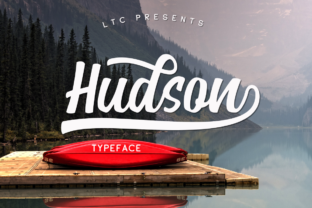
Choosing a typeface often feels like a minor detail in the broader arc of a project. But in practice, a font does more than display text—it sets a tone, guides perception, and either smooths or disrupts the reader’s experience. Hudson occupies a specific and useful place in this process. It is a hand-drawn font that draws its inspiration from nature, blending a playful, modern silhouette with the organic irregularities that make letterforms feel alive. Understanding where and how to deploy it can transform a piece of communication from generic to intentional.
This article looks at Hudson not as a novelty, but as a practical tool within planning, creative execution, and long-term brand maintenance. Whether you are a freelancer building a visual identity, a marketer preparing campaign materials, or an entrepreneur shaping your first consistent look, the goal here is to help you integrate Hudson into your actual workflow with clarity and purpose.
What Hudson Brings to a Project
Hudson is not a neutral, workhorse font like Helvetica or Roboto. It carries personality. The hand-drawn quality gives each character a slight unpredictability—a curve that feels sketched, a terminal that doesn’t geometrically snap to a grid. This matters because readers subconsciously register that human touch. In contexts where you want approachability, warmth, or a sense of craft, Hudson does that work for you.
The nature-inspired influence is not abstract. Look closely at the stroke contrasts and the openness of the counters—they recall forms found in leaves, water, and organic growth. This does not mean the font is limited to environmental or outdoorsy brands. Rather, it means Hudson can inject a grounded, natural feeling into any project, whether that is a coffee shop menu, a children’s book layout, a lifestyle blog, or a corporate sustainability report.
From a practical standpoint, Hudson works across several common use cases:
- Branding and identity: Logos, wordmarks, and primary headlines where distinctiveness matters.
- Corporate communications: Internal newsletters, presentation covers, and branded stationery that need to feel less rigid.
- Apparel and merchandise: Screen-printed typography on t-shirts, hoodies, and tote bags benefits from the font’s organic rhythm.
- Digital and print marketing: Social media graphics, landing page headers, and brochure titles that invite engagement.
Before the Project: Evaluating Fit and Preparing Assets
Integration begins before you open your design software. The first decision is whether Hudson aligns with the emotional tone of the deliverable. Because of its hand-drawn nature, it leans casual and expressive. If your project demands extreme formality—legal documents, financial tables, or highly technical manuals—Hudson may feel out of place as body text. However, it often works beautifully as a display face paired with a clean sans-serif for readability.
Preparation involves checking licensing and format compatibility. Most font vendors offer Hudson in OTF, TTF, and sometimes variable formats. If you are working in a team environment, confirm that all collaborators have the font installed or that you are using a web font service that supports it. For web use, pay attention to file size and load times; a hand-drawn font with many glyphs can be heavier than a standard system font. Subsetting the font to include only the characters you need keeps performance smooth.
Consider creating a small style guide before production. Note the intended weights (if multiple exist), the ideal point-size range for headlines versus subheadings, and any tracking or kerning adjustments that compensate for the hand-drawn irregularities. This upfront work prevents inconsistency when multiple people touch the same project.
During the Creative Process: Integrating Hudson into Design Work
When you start laying out a design, Hudson behaves differently than a geometric font. The organic shapes may not align perfectly with strict grids. This is not a bug—it is the feature. But it does require a shift in workflow. Rather than forcing the font into a rigid column structure, let the letterforms guide your composition. Allow extra margin space around headlines so the characters can breathe. Avoid heavy letter-spacing, which can undermine the hand-drawn illusion.
In branding projects, use Hudson for the primary mark or hero text. Pair it with a secondary font that provides contrast without competing. For example, a neutral sans-serif like Montserrat or Open Sans in body copy lets Hudson stand out. In apparel design, the font’s irregular strokes translate well to screen printing because they mask minor registration shifts that can occur during production.
During the iteration phase, test Hudson at different sizes and on different backgrounds. A light-colored, textured background often enhances the nature-inspired feel, while a stark white background may make the hand-drawn quality feel isolated. Mock up physical samples if possible—seeing Hudson on a printed page or a fabric swatch reveals details that screens hide.
Workflow Example: Brand Identity for a Small Business
Imagine you are building a brand for a local plant nursery that also sells handmade pottery. The owner wants approachable, artisan, and rooted in nature. Your process might look like this:
- Use Hudson for the business name in the logo. Sketch a few custom letter variants to complement the font’s natural feel.
- Select a secondary sans-serif for product descriptions and signage.
- Create social media templates using Hudson in headlines, paired with a light botanical illustration style.
- Prepare apparel mockups for staff t-shirts, using Hudson in a single color with a screen-print friendly stroke thickness.
- Test readability on a variety of materials—kraft paper bags, ceramic tags, and wooden signs.
In this scenario, Hudson does not just decorate text. It communicates the brand’s core values before a customer reads a single word.
After the Project: Quality Control and Long-Term Consistency
Once the design is finalized, the workflow shifts to production and maintenance. If you are delivering files to a client or a print shop, include the font files or outline the type where necessary to avoid substitution issues. For digital projects, ensure web font loading is optimized and that fallbacks are specified in case the font fails to load.
Long-term consistency is about documentation. Add Hudson to your organization’s brand guidelines with clear usage rules: minimum size, acceptable color palettes, and pairing recommendations. This prevents future team members from misusing the font—for example, setting it at too small a size where the hand-drawn details become muddy, or using it for lengthy body text where readability drops.
For ongoing projects like a blog or a social media series, create reusable templates. Lock in the font sizes, line heights, and spacing that work best with Hudson. This saves time and maintains visual coherence across dozens of posts or pages.
Practical Observations and Integration Tips
Over several projects using hand-drawn fonts like Hudson, a few practical observations stand out:
- Size matters more than with geometric fonts. At very small sizes (under 14pt), the organic details can vanish. Reserve Hudson for display roles above 24pt where possible.
- Color contrast should be considered deliberately. Hand-drawn fonts often perform better with moderate contrast—think dark charcoal on cream rather than pure black on white.
- Do not over-layer. Because Hudson already has visual texture, avoid placing it over busy patterns or photographs with high detail. Let the type be the focal point.
- Customize sparingly. If you have the skill, tailoring a few letterforms for a specific logo can elevate the result. But avoid distorting the font (stretching, skewing) as it destroys the hand-drawn integrity.
- Test in your actual medium. A font that looks charming on screen can feel different when printed on textured paper or embroidered on fabric. Always prototype.
Integrating Hudson with Other Tools and Platforms
Hudson does not exist in isolation. It interacts with the rest of your toolkit. In design software like Adobe Illustrator or Figma, use the font’s open-type features if available—alternates, ligatures, and swashes can add variety without extra work. In web platforms like WordPress or Squarespace, upload the font via custom CSS or a plugin, and test rendering across browsers.
When collaborating with other creatives—copywriters, illustrators, or developers—communicate why you chose Hudson. Share a brief explanation of its nature-inspired origins and the tone it conveys. This helps others make informed decisions about layout, imagery, and interactivity that support the font rather than clash with it.
For entrepreneurs and small business owners who manage their own marketing, Hudson can be a reliable anchor. Use it across business cards, your website header, and product packaging. Over time, that consistent visual thread builds recognition. Customers may not articulate why everything feels cohesive, but they will feel it.
Long-Term Use: Keeping the Font Fresh
Any distinctive typeface risks becoming predictable if overused in the same way. To keep Hudson effective over months or years, vary how you apply it. Alternate between all-caps and sentence case. Combine it with different secondary fonts. Change the supporting color palette seasonally. The font itself stays the same, but the compositions evolve.
Also revisit the font’s own updates. Some foundries release expanded character sets or additional weights over time. Checking back periodically ensures you are not missing useful variants that could open new design possibilities.
Final Thoughts on Using Hudson in Real Work
Hudson is not a font you use accidentally. It is a deliberate choice that signals warmth, craftsmanship, and a connection to organic form. When integrated thoughtfully into a process—from initial planning through production and long-term maintenance—it becomes more than decoration. It becomes a recognizable part of how an audience experiences your work.
Whether you are a freelancer tightening a brand’s visual language, a marketer refreshing campaign assets, or a business owner building a consistent look across physical and digital touchpoints, Hudson rewards the same careful planning that any strong tool requires. Know why you are using it. Use it consistently. And let its natural, human quality do the work that no mechanical typeface can replicate.