Mia Bella Font: Evaluating Its Design, Practical Uses, and Real Tradeoffs
Once in a while, a font makes you stop and take notice. Mia Bella is one of those typefaces. With its romantic, vintage character and delicate details, it has found a place in projects ranging from wedding invitations to Valentine’s cards. But like any design resource, Mia Bella comes with specific strengths and limitations. Understanding these can help you decide whether it fits your project or whether another option might serve you better.
What Makes Mia Bella Distinct
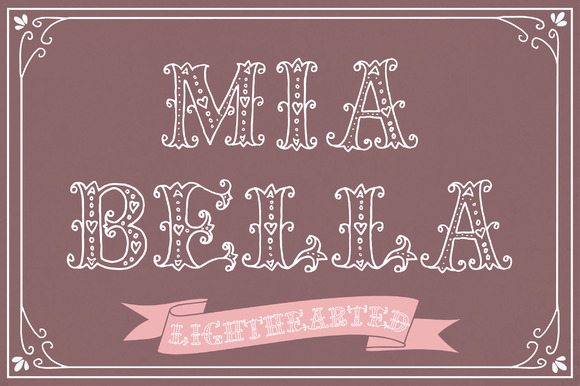
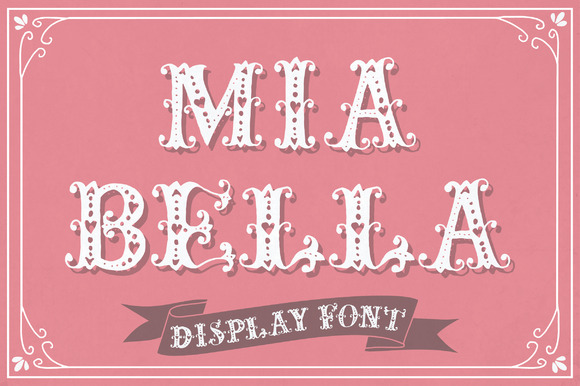
Mia Bella belongs to the category of decorative script fonts, but it stands apart because of its attention to fine detail and its vintage atmosphere. Every character carries small flourishes, gentle curves, and ornamental touches that give it a handcrafted feel. This is not a minimalist or modern font. Instead, it evokes a sense of nostalgia and romance, making it suitable for projects where warmth and personality are important.
The font includes built-in bonus borders that you access by typing simple character sequences: three quotation marks, three dashes, or similar combinations. This feature allows you to create custom decorative frames and dividers without needing separate graphic elements. For someone working on invitations or signage, this can save time and keep the design cohesive.
Mia Bella works in any application that supports installable fonts, including Silhouette Studio, Cricut Design Space, Microsoft Word, Adobe Photoshop, and Adobe Illustrator. This broad compatibility means you can use it across different tools without needing to convert or reformat files.
Comparing Mia Bella with Other Decorative Scripts
When you are choosing a font for a romantic or vintage project, you have many options. Understanding how Mia Bella compares with other similar typefaces can clarify whether it is the right fit for your specific needs.
Level of Detail and Ornamentation
Mia Bella is highly detailed. Each letter includes fine decorative elements that contribute to its vintage charm. This level of ornamentation is both a strength and a tradeoff. Fonts with less detail, such as simpler script typefaces, tend to be easier to read at small sizes and cut more cleanly on machines like Cricut or Silhouette. Mia Bella’s intricate shapes can make it harder to cut accurately, especially if you are working with small text or delicate materials like paper or vinyl. If you need a font that produces clean cuts with minimal weeding, a simpler script may serve you better. If you prioritize visual richness and are willing to spend extra time on preparation, Mia Bella rewards that effort.
Vintage Aesthetic
Many fonts aim for a vintage look, but they achieve it in different ways. Some rely on distressed textures or irregular shapes. Others, like Mia Bella, achieve a vintage feel through elegant, old-fashioned letterforms and decorative swashes. If your project calls for a refined, romantic vintage style—such as a wedding invitation, an anniversary card, or a decorative sign—Mia Bella can deliver that atmosphere naturally. For projects that need a more rustic, gritty, or industrial vintage look, a distressed or hand-drawn font might be a better match.
Ease of Use for Beginners
Mia Bella installs like any standard font and works across major software platforms. The online manual included with the font explains installation and usage for different applications, which is helpful if you are new to using custom fonts. However, because of its detailed shapes, beginners may find that cutting or printing requires some trial and error. If you are just starting with design software or a cutting machine, you might find a simpler font easier to handle at first. With practice, the extra steps become manageable, but it is worth considering your comfort level before committing.
Best-Fit Use Cases for Mia Bella
Certain projects naturally suit Mia Bella’s style. Understanding where it excels can help you decide when to choose it and when to look elsewhere.
Wedding Invitations and Formal Stationery
The romantic, elegant quality of Mia Bella makes it a strong candidate for wedding invitations, save-the-date cards, and thank-you notes. The built-in border characters allow you to frame text or separate sections without adding extra graphics. If you are designing a cohesive suite of stationery, using the same font across multiple pieces maintains visual harmony.
That said, readability matters in formal invitations. Because Mia Bella has fine details and flourishes, it works best for short phrases, names, and titles. For body text, such as event details or directions, you may want to pair it with a cleaner, more legible font. This combination lets you enjoy the decorative quality of Mia Bella where it shines while ensuring that important information remains easy to read.
Valentine’s Day Cards and Romantic Projects
Mia Bella is well suited for Valentine’s cards, love notes, or personalized gifts. Its sweet, affectionate character aligns naturally with romantic themes. The bonus borders can be used to create heart-shaped frames or decorative edges without additional design work. If you are making a one-of-a-kind card for someone special, Mia Bella adds a handmade feel that standard fonts often lack.
Decorative Signs and Home Décor
For a beautifully decorated sign, Mia Bella can be a fitting choice. Its vintage details give signs a classic, timeless look. Whether you are creating a welcome sign for a wedding, a quote for a nursery, or a piece of wall art, the font’s ornamental quality helps the text feel like part of the decoration rather than just information. Keep in mind that larger sizes work best to preserve the intricate details. If you are cutting the design from wood or vinyl, test the cut settings on a scrap piece first to avoid losing fine elements.
Practical Considerations and Limitations
No font is perfect for every situation. Mia Bella has some practical tradeoffs that matter depending on your project and tools.
Cutting Challenges
Because of the fine details in Mia Bella, cutting with a machine like Cricut or Silhouette can be tricky. Narrow stems, delicate loops, and small flourishes may not cut cleanly, especially at smaller sizes. This does not mean the font cannot be cut successfully, but it may require careful adjustment of cut settings, blade type, and material. Some users find that simplifying the design or enlarging the text helps. Others choose a less detailed font for projects that demand precision cutting. As one designer noted, “Nobody said it should be easy to make beautiful things.” If you are willing to invest the time, the result can be striking.
Readability at Small Sizes
Mia Bella is not ideal for small body text. When reduced to 12 points or smaller, the ornamental details can blur together, making the text harder to read. For address labels, small captions, or detailed forms, a simpler sans-serif or clean script font is usually a better choice. Reserve Mia Bella for larger headings, names, or short phrases where the details have room to breathe.
Compatibility Across Software
The font works in any program that supports installable fonts, which includes most design and office applications. This is a clear advantage because you do not need specialized software to use it. However, the way different programs handle decorative fonts can vary. In Silhouette Studio or Cricut Design Space, you may need to adjust letter spacing or weld letters together to ensure clean cuts. In Microsoft Word, the border characters may behave differently depending on version and settings. The online manual provides specific guidance, but it helps to test the font in your chosen application before finalizing a project.
When You Might Want Another Option
Mia Bella is a wonderful font for the right project, but it is not a universal solution. If your project requires clean, minimalist design, the ornamentation may feel out of place. If you need a font that cuts perfectly with no extra effort, a simpler option will save frustration. If you are working with very small text, a font designed for legibility at low point sizes would serve you better.
Other decorative scripts may offer different features that suit your needs more closely. Some fonts provide multiple stylistic sets, allowing you to switch between ornate and simple versions of the same letter. Others include more extensive punctuation or language support. Comparing these aspects against Mia Bella can help you find the best match for your project.
Decision Factors to Consider
Before choosing Mia Bella, think about the following:
- Project size and scale: Will the text be large enough to show off the details?
- Cutting requirements: Are you prepared to adjust settings and test materials for detailed cuts?
- Readability needs: How much text will you include, and at what size?
- Overall style: Does your project lean romantic, vintage, and elegant—or modern, rustic, or minimalist?
- Time and patience: Do you have the time to experiment with settings and make adjustments if needed?
If your answers lean toward a decorative, romantic, and carefully crafted design, Mia Bella is worth considering. If you need speed, simplicity, or precision at small sizes, a different font may serve you better.
Making an Informed Choice
Mia Bella is a font with a clear personality and a specific sweet spot. It excels in projects that call for romance, vintage charm, and ornamental detail. It offers built-in borders that simplify design work, and it works across a wide range of applications. At the same time, its intricate shapes require patience during cutting and may limit readability at small sizes.
The best choice depends on matching the font’s strengths to your project’s needs. If you value beauty over speed and are willing to handle its quirks, Mia Bella can help you create something genuinely special. If your priority is efficiency, precision, or minimalism, exploring other options may lead to a better fit. Either way, understanding what Mia Bella offers and where it has tradeoffs puts you in a stronger position to make a decision that works for you.