Mia Bella Lighthearted: Vintage Charm for Your Creative Projects
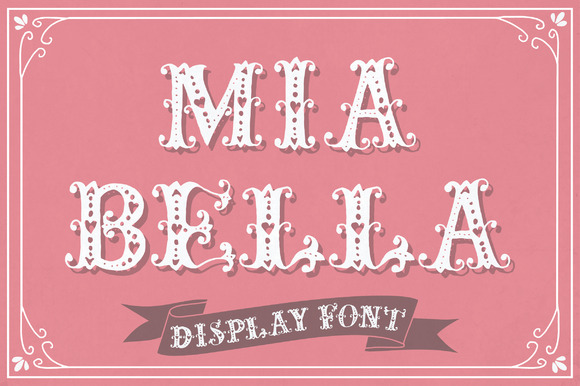
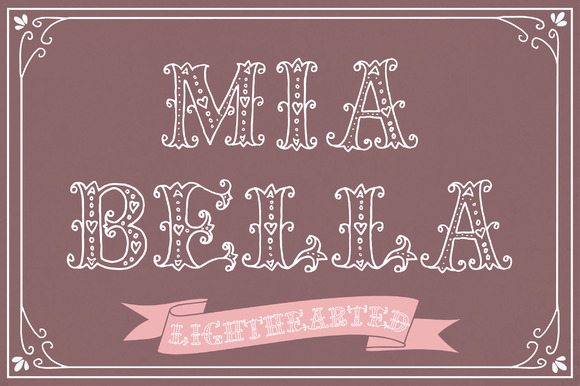
If you enjoy fonts that feel personal and timeless, Mia Bella Lighthearted offers a distinctive blend of romance and restraint. As the lighter companion to the original Mia Bella, this hand-drawn typeface keeps the delicate, vintage soul of its predecessor while offering a more airy, approachable presence. Every letter carries subtle decorative details that make it feel crafted rather than generic—perfect for projects where you want warmth without losing clarity.
The name Lighthearted is fitting. This font has a soft, nostalgic quality that brings to mind handwritten notes from another era, but its readability and structure keep it firmly grounded in practical use. Whether you are designing a wedding invitation, crafting a thank you card, or decorating a nursery wall, the font adds a layer of intention and charm that feels both personal and professional.
What Makes This Font Stand Out
Many script fonts rely on sweeping flourishes that can overwhelm a layout. Mia Bella Lighthearted takes a more measured approach. Each character contains beautiful little details—tiny swashes, delicate curves, and subtle variations in stroke weight—that reward close inspection. When used at larger sizes, these details become a focal point. At smaller sizes, they add texture without sacrificing legibility.
The vintage character of the font is not limited to its letterforms. The overall feeling is reminiscent of antique lace, faded photographs, and handwritten correspondence from a slower time. This makes it especially suited for projects that aim to evoke sentiment, tradition, or quiet elegance. Unlike many modern script fonts that lean towards casual or playful, Mia Bella Lighthearted holds a sense of ceremony and care.
One of its most practical features is the inclusion of bonus borders. By typing simple character combinations like ……, “““, or ——, you can access decorative border elements. These can be used individually or combined to create custom frames, dividers, or edge decorations. This is a significant time-saver for designers who want to add embellishment without opening a separate illustration program.
Practical Applications for Creators and Small Business Owners
If you run a small business, especially in the wedding, stationery, or home decor space, Mia Bella Lighthearted can become a signature element of your brand. A font like this communicates care and attention to detail without requiring you to hand-letter every piece. Use it for:
- Wedding stationery suites: Save-the-dates, invitations, programs, menus, and thank you cards all benefit from the font’s cohesive, romantic feel. The border elements can frame ceremony details or separate sections of a multi-page invitation.
- Gift tags and packaging: Print names or short messages on kraft paper or card stock for a handmade look that still feels polished. The vintage quality pairs well with natural textures like twine, linen, or pressed flowers.
- Wall art and nursery decor: The font’s light, graceful lines work beautifully for motivational quotes, children’s names, or birth announcements. Because the details are intricate, printing rather than cutting is recommended for the best result.
- Social media graphics: Use it for quotes, announcements, or layered typography in photo overlays. The soft character contrasts well with modern sans-serif fonts for a balanced composition.
Adapting Mia Bella Lighthearted for Different Formats and Platforms
One of the font’s strengths is its versatility across applications. Because it is a standard installable font, it works with most design software, including Cricut Design Space, Silhouette Studio, Microsoft Word, Photoshop, and Illustrator. This accessibility means you are not locked into a single platform or workflow.
However, the fine details that make the font beautiful can also present challenges in certain contexts. For cutting machines like Cricut or Silhouette, the thin strokes and delicate swashes may be difficult to cut cleanly, especially at small sizes. To get the best result, consider these approaches:
- Increase the size of your text so the fine lines are thick enough for the blade to follow.
- Test on scrap material before cutting your final project.
- Use a deeper cut setting or a finer blade if available.
- If cutting is too difficult, consider printing the design onto adhesive paper or card stock and then cutting manually around a simple shape.
For printing projects, you will have no such limitations. The font renders beautifully on both home printers and professional machines. For best results, use a high-quality card stock or textured paper to complement the vintage aesthetic. Avoid overly busy backgrounds; the font shines when given room to breathe.
The font package also includes a link to an online manual that walks you through installation and use across different applications. This is especially helpful if you are new to working with decorative fonts or switching between programs for different parts of your workflow.
Creating Custom Borders and Decorative Frames
The bonus border characters add another layer of creative control. Instead of relying on generic clip art or pre-made frames, you can build your own decorations by combining the available characters. For example:
- Type a row of —— to create a thin, elegant line that can separate sections of a menu or program.
- Use …… at the corners of a square or rectangle to frame a name or date.
- Combine “““ with other elements to create a more ornate border that wraps around a central text block.
This kind of modular design ensures that your finished piece feels custom without requiring advanced illustration skills. It also allows you to maintain a consistent style throughout a project, from the main typography to the surrounding decorations.
Who Benefits Most from This Font
The audience for Mia Bella Lighthearted is broader than one might expect. While it naturally appeals to wedding and stationery designers, it is also a strong choice for:
- Bloggers and content creators: Use it for blog headers, quote graphics, or Pinterest pins. The vintage feel stands out in feeds dominated by modern minimalism.
- Educators and hobbyists: Create classroom materials, posters, or personal projects that feel warm and inviting. The font’s readability makes it suitable for short phrases or names.
- Marketers: For brands that want to convey tradition, quality, or personal touch, this font can become part of a visual identity that sets you apart from competitors.
- Freelancers and entrepreneurs: If you offer design services, adding a font like this to your toolkit expands the range of styles you can offer clients, especially for projects involving romance, family, or nostalgia.
Keeping Your Work Clear and Consistent
Even the most beautiful font can become problematic if used carelessly. To maintain clarity and effectiveness when working with Mia Bella Lighthearted:
- Limit its use to headlines, names, short phrases, or accent text. For longer body copy, pair it with a simple, neutral font like a classic serif or clean sans-serif.
- Avoid overloading a single design with too many decorative elements. The border characters are useful, but a little goes a long way. Use them to frame, not to overwhelm.
- Pay attention to spacing. Hand-drawn fonts often benefit from adjusted letter spacing or kerning to ensure that the delicate details do not collide or disappear.
- Consider your audience. A vintage, romantic font may not suit every brand or message. Use it where the tone matches the content—personal, sentimental, or celebratory.
Mia Bella Lighthearted offers a rare combination: the warmth of hand-drawn lettering and the reliability of a well-crafted digital font. Its vintage details reward attention, its border system adds flexibility, and its compatibility across platforms makes it a practical choice for creators at any level. Whether you are printing a single card or designing a full suite of wedding materials, this font brings a sense of care and beauty that elevates the finished work. The key is to use it thoughtfully, letting its charm enhance your message rather than compete with it.