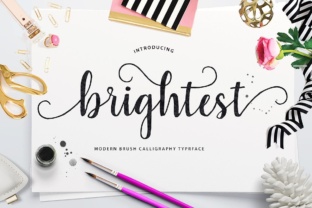
Brightest: A PUA-Encoded Font with Over 260 Unique Glyphs
If you have ever tried to add a special flourish to a design only to find that your font choice simply does not include the symbol you need, you already understand the value of a well-built typeface. Brightest steps into that exact gap with a clean, modern aesthetic and a remarkable library of over 260 distinct glyphs, all packaged in a PUA-encoded format. This combination makes it more than just another font file; it becomes a practical tool for anyone who wants to bring a little more personality and precision to their words. Whether you are designing a logo, formatting a presentation, or adding visual interest to a social media post, Brightest offers a depth of character that standard fonts rarely provide.
What Makes Brightest Different from Standard Fonts
At first glance, Brightest looks like a polished, contemporary typeface that would fit naturally on a website or in a print layout. But the real surprise is what happens when you start exploring its glyph set. Most fonts give you letters, numbers, and a handful of punctuation marks. Brightest gives you all of those, plus decorative alternates, ligatures, swashes, and special symbols that you can access directly from your keyboard thanks to Private Use Area encoding. PUA encoding means that these extra characters are mapped to Unicode slots that most design software recognizes, so you do not need complicated workarounds or third-party apps to use them. You simply switch to the glyph panel in your program, pick the alternate character, and insert it.
For someone who is not deeply technical, this matters because it removes the friction between wanting a unique look and actually achieving it. You do not need to be a typography expert to swap out a standard letter for a more elegant version or to drop in a decorative element that frames your text. The font does the heavy lifting for you.
Creative Freedom without the Learning Curve
One of the biggest frustrations for beginners and casual users is the gap between what they imagine and what their tools allow them to produce. You might have a clear idea for a wedding invitation or a branding mark, but if your font lacks the right swashes or stylistic sets, you end up settling for something generic. Brightest addresses this directly by putting over 260 glyphs at your fingertips, many of which are designed to work together as cohesive visual elements. The alternates are not random; they follow the same design language as the base characters, so your text remains readable and harmonious even when you dress it up.
For example, imagine you are designing a simple quote graphic for Instagram. With a basic font, you might rely on size and color to create emphasis. With Brightest, you can replace the first letter of a key word with a decorative swash version, add a subtle flourish to the end of a line, and include a small heart or star glyph as a divider. Each change is small on its own, but together they transform the piece from flat to polished. This kind of flexibility is what makes the font appealing not just to professional designers, but to hobbyists, bloggers, and small business owners who want their materials to look intentional without hiring a specialist.
Practical Applications across Personal and Professional Projects
The versatility of Brightest becomes most apparent when you consider the variety of contexts where a PUA-encoded font with an extensive glyph set can add value. Here are several realistic scenarios where this typeface can make a noticeable difference.
Branding and Identity Work
Small business owners and freelancers often need to create logos, business cards, and marketing materials on a tight budget. Purchasing a custom logo can be expensive, but using a generic font can make your brand look forgettable. Brightest sits in a sweet spot: it is distinctive enough to give your identity a unique feel, yet flexible enough that you can use it across multiple applications. The decorative glyphs can serve as standalone brand marks, bullet points in a brochure, or accent elements on a website header. Because the font includes multiple variants for many letters, you can also create a custom wordmark that does not look exactly like anyone else’s, even if they use the same typeface.
Event and Wedding Stationery
Wedding invitations, save-the-dates, and event programs are areas where typography plays an outsized role in setting the tone. Couples and event planners alike look for fonts that feel special without being overly ornate or difficult to read. Brightest offers a balance between elegance and legibility. The extra glyphs allow you to add flourishes to names, create decorative borders using repeated symbols, and include small icons that match the theme of the event. Since the font is PUA-encoded, you can even type out the entire invitation and then substitute alternate glyphs without retyping the text.
Social Media Content and Digital Marketing
Anyone who manages social media accounts knows that standing out in a crowded feed requires more than just good photography. Text overlays, quote cards, and promotional graphics all benefit from typography that feels fresh. Brightest gives you the ability to create consistent visual branding across platforms without relying on stock graphics. The decorative glyphs can replace boring bullet points, act as separators between sections of a carousel post, or add a finishing touch to a call-to-action button. For marketers and content creators, this means faster turnaround and more control over the final look.
Educational Materials and Handouts
Teachers, tutors, and educators who prepare worksheets, flashcards, or classroom posters can use Brightest to make their materials more engaging for students. The extra glyphs can be used to highlight key terms, add small illustrations without needing clip art, or create visually organized layouts that help learners follow along. Because the font remains highly readable at various sizes, it works well for both titles and body text in print or on screen.
Personal Projects and Hobbies
Hobbyists who enjoy scrapbooking, journaling, card making, or digital art will find Brightest especially rewarding. The extensive glyph set means you can treat the font almost like a mini illustration kit. You might use it to label sections of a scrapbook page, create a custom monogram for a gift tag, or add decorative headers to a diary entry. The fact that it operates inside standard design software means you can incorporate it into projects that mix typed and handwritten elements without a noticeable clash in style.
What to Consider Before You Start Using Brightest
While Brightest is designed to be accessible, there are a few practical points worth keeping in mind before you dive in. First, because the font relies on PUA encoding, you will want to use a design application that supports the glyph panel. Programs like Adobe Illustrator, Photoshop, InDesign, Affinity Designer, Procreate, and even Microsoft Word (with some limitations) can access the extra characters. If you are using a more basic text editor, you may only see the standard letters, which defeats the purpose of the extended glyph set. Checking compatibility ahead of time saves frustration.
Second, take the time to explore the full glyph library before you start a project. Many users download a PUA font and immediately try to use it without realizing how many alternates are available. Spend a few minutes scrolling through the glyph panel or using a font map that the designer provides. You might discover a particular swash or symbol that inspires a whole design direction.
Third, consider the context of your project carefully. A font with over 260 glyphs offers a lot of creative freedom, but that freedom should serve the message, not overwhelm it. Using too many decorative alternates in a single piece can make the text feel busy or hard to read. The most effective uses tend to be restrained, using one or two special glyphs as focal points while letting the base letters carry the weight.
Finally, pay attention to licensing. Fonts with extensive glyph sets sometimes come with specific restrictions regarding commercial use, embedding, or redistribution. Before you use Brightest in a product you plan to sell or in a client project, confirm that your license covers that use case. This is a standard step with any quality typeface and ensures you can use the font confidently without legal concerns.
Getting the Most Out of Your Glyph Set
Once you have Brightest installed and your software is ready, the most important skill to develop is simply experimentation. Try typing a word and then swapping out several letters for alternates to see how the rhythm of the text changes. Pair the font with a simple sans-serif for body copy so that the decorative elements stand out. Use the special glyphs as section dividers in a newsletter or as subtle watermarks behind a headline. The more you play, the more you will discover natural combinations that feel like they were made for your specific project.
For those who are still building confidence, start with a single project where the font plays a supporting role rather than the lead. Use it for a title or a pull quote instead of an entire body of text. This allows you to get comfortable with the glyph panel and the substitution process without the pressure of making the font carry the whole design. Over time, you will find yourself reaching for Brightest more often simply because it offers a level of detail that ordinary fonts cannot match.
Brightest earns its name not by being flashy or loud, but by offering a clarity and richness that makes your work look more considered. The 260-plus glyphs are not just extras; they are tools that bridge the gap between ordinary and intentional. Whether you are a seasoned professional looking for a reliable workhorse or a beginner taking your first steps into design, this typeface gives you the means to express yourself with precision and flair.