Munira Script: Blending Calligraphic Elegance with Practical Workflow Integration
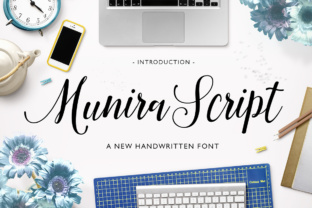
Typography shapes every piece of communication, from brand identities to classroom handouts. While sans-serif fonts often handle body text efficiently, a distinctive headline or accent font can elevate the entire message. Munira Script offers a modern calligraphic style that balances artistry with utility. With both regular and bold weights, this font is designed for professionals who need expressive typography without sacrificing clarity. Its strokes feel handmade yet structured enough to integrate into digital workflows, making it a versatile asset for creators, marketers, and small business owners alike.
Why a Calligraphic Font Belongs in Your Process
Calligraphic fonts have traditionally been reserved for formal invitations or decorative use. Modern workflows demand more flexible tools. Munira Script breaks that mold by providing two distinct weights that allow for hierarchy and emphasis within a single typeface family. In a typical project—whether designing a landing page, outlining a presentation, or creating a social media graphic—you need fonts that can serve multiple roles. Munira Script’s regular weight works beautifully for headings, pull quotes, or short paragraphs, while the bold version handles subheads, buttons, or other focal points.
Integrating a calligraphic font early in the planning stage influences decisions about layout, color palette, and even tone of voice. When you select Munira Script before drafting content, you can tailor copy length and rhythm to match the font’s natural curves. This coherence reduces revision rounds later. During the execution phase, the regular and bold variants help you quickly establish visual hierarchy without switching to a different typeface. After a project, the consistent use of Munira Script across materials reinforces brand recall—especially useful for freelancers and small business owners managing multiple touchpoints.
Preparation: Choosing Where Munira Script Fits Best
Before you open a design tool, assess the context. Munira Script shines in environments that benefit from a personal, crafted feel. This includes client proposals, event promotions, product packaging mockups, and educational slide decks. It also works well in digital spaces where a human touch is needed—like email newsletters or course landing pages.
Compatibility Considerations
- File formats: Munira Script is typically available in OTF and TTF formats, ideal for both print and screen applications. Web font versions (WOFF/WOFF2) may be provided depending on the source, making it ready for CSS integration.
- Software compatibility: It works natively in Adobe Creative Suite, Figma, Sketch, Canva, and most word processors. Before starting a team project, ensure all collaborators have the font installed to avoid substitution surprises.
- Pairing with other fonts: Since Munira Script has a calligraphic feel, pair it with a clean sans-serif (e.g., Open Sans, Inter) or a refined serif (e.g., Lora) for body text. The bold weight should be reserved for short, impactful phrases—overuse can reduce legibility.
Implementation in Real Workflows
Whether you are a marketer building a campaign or an educator designing a workshop handout, Munira Script can be dropped into your existing routine with minimal friction. Below are common scenarios and how the regular and bold weights support each stage.
Branding and Identity Projects
Early in a branding project, you often experiment with logo marks and taglines. The regular weight of Munira Script adds a flowing, approachable feel to business names, while the bold version gives weight to secondary taglines or value propositions. During the asset creation phase, you can use the bold variant for headings in brand guidelines and the regular variant for accent text in social media templates. This consistency reduces the number of font choices and keeps the identity cohesive.
Content Marketing and Social Media
Marketers frequently juggle fast turnaround times. Munira Script’s two-weight system allows you to reuse a single font family across different graphic sizes. For Instagram posts, use the bold weight for the main call-to-action and the regular weight for decorative subheads. Because the font is modern and not overly ornate, it remains readable even on mobile screens. When planning a campaign calendar, designate Munira Script for all quote-style visuals—this creates a recognizable pattern that audiences associate with your brand.
Presentations and Educational Materials
Educators and trainers often rely on slides to reinforce spoken content. A full deck in a calligraphic font can be overwhelming, but using Munira Script sparingly—for section titles or key takeaways—adds visual interest. The regular weight works well for slide headers, while the bold weight can emphasize a single statistic or concept. Prepare a template in your presentation tool (PowerPoint, Keynote, or Google Slides) with Munira Script pre-applied to title placeholders. This streamlines content creation and ensures each new slide maintains the same typographic quality.
Publishing and Blogging
Bloggers and online publishers need a consistent look that doesn’t slow down content production. If your site uses a CMS like WordPress or Squarespace, you can upload Munira Script as a web font for block quotes, author bios, or decorative dividers. The regular weight is appropriate for short introductions, while the bold weight works for pull quotes or sidebar highlights. By defining these uses in your CSS before you start writing, your articles will automatically apply the correct styling without manual adjustments.
Efficiency and Organization in Team Environments
When multiple people touch the same project, font consistency becomes a quality-control issue. Munira Script’s clear naming convention (regular vs. bold) reduces confusion. For teams, create a shared font library in cloud storage or use a platform like Adobe Fonts (if licensed). Include a simple usage guide: specify where each weight should appear, and provide sample layouts. This is especially valuable for freelancers who collaborate with printers, developers, or other designers.
Beyond installation, organize your design files by labeling text layers with the weight name (e.g., “Header – Munira Bold”). This practice helps when revisiting old projects months later—you can quickly identify which variant was used and avoid accidental replacements. In web projects, define CSS classes like .munira-script-regular and .munira-script-bold to enforce consistency across pages.
Long-Term Use and Scalability
Investing time in a font pays off when it becomes a reliable part of your toolkit. Munira Script’s two-weight structure supports scalability: as your business grows—adding new product lines, expanding to international audiences, or launching sub-brands—you can rely on the same font to maintain brand cohesion. Because it’s not a novelty font that quickly feels dated, it works for both short-term campaigns and enduring brand assets.
Quality Control Across Mediums
- Print testing: Always test Munira Script at smaller point sizes. Calligraphic fonts can lose detail when printed at 8pt or below. Reserve regular and bold weights for headings (14pt+) and use simpler fonts for body copy.
- Screen testing: Check how the font renders on various browsers and devices. Some web browsers may render calligraphic fonts with slight variations; specify fallback fonts in your CSS to preserve readability.
- Legibility in longer text: Munira Script is not designed for long reading passages. Use it for short bursts—titles, emphasis, and decorative elements. This preserves its impact and prevents fatigue.
Practical Observations from Regular Use
Over months of using Munira Script in daily workflows, a few patterns emerge. First, the bold weight is significantly thicker than the regular, which makes it ideal for contrast but also means it can dominate a layout. Balance is key: pair a bold heading with generous whitespace. Second, the font’s calligraphic nature encourages a lighter, more storytelling tone in accompanying text. Many users find that once they adopt Munira Script, they naturally shorten headlines and let the typography carry the emotional weight.
Another observation involves file management. Because Munira Script includes only two weights, it avoids the bloat of massive variable font families. This makes it faster to embed in web projects and easier to share via email with clients. For entrepreneurs who often send PDFs or editable design files, smaller font file sizes mean quicker uploads and fewer compatibility issues.
Bringing Munira Script Into Your Daily Routine
Adopting a new font doesn’t have to overhaul your entire process. Start small: pick one project—a client proposal, a social media campaign, or a personal brand update—and commit to using Munira Script for all headings and accents. Download both weights, install them, and create a simple template. As you work, note where the regular weight feels too light or the bold weight too heavy. Adjust spacing and sizing accordingly. After one project, you’ll have a clearer sense of how the font behaves in your specific context.
For creators who juggle multiple roles, Munira Script offers a rare combination: the personality of hand-drawn lettering and the practicality of a predictable weight system. It doesn’t require you to be a calligrapher or spend hours adjusting curves. Instead, it fits into existing workflows—before, during, and after the creative process—helping you communicate with warmth and precision. Whether you’re a small business owner refining your logo or a freelancer client proposal, integrating this font thoughtfully can enhance both the aesthetic and the efficiency of your work.
Ultimately, the value of any tool lies in how seamlessly it supports your objectives. Munira Script, with its regular and bold variants, provides a clear path from concept to completion. By preparing your environments, testing across mediums, and applying it consistently, you turn a beautiful font into a reliable part of your process—one project at a time.